CHROME NEW TAB WIDGETS

Five useful Chrome widgets. One personal new tab.

Deskpot brings a Chrome countdown timer, currency converter, calendar, weather widget, and sticky notes together with your visual shortcuts and folders. It is free to install and works without a Deskpot account.

Add to Chrome · Free
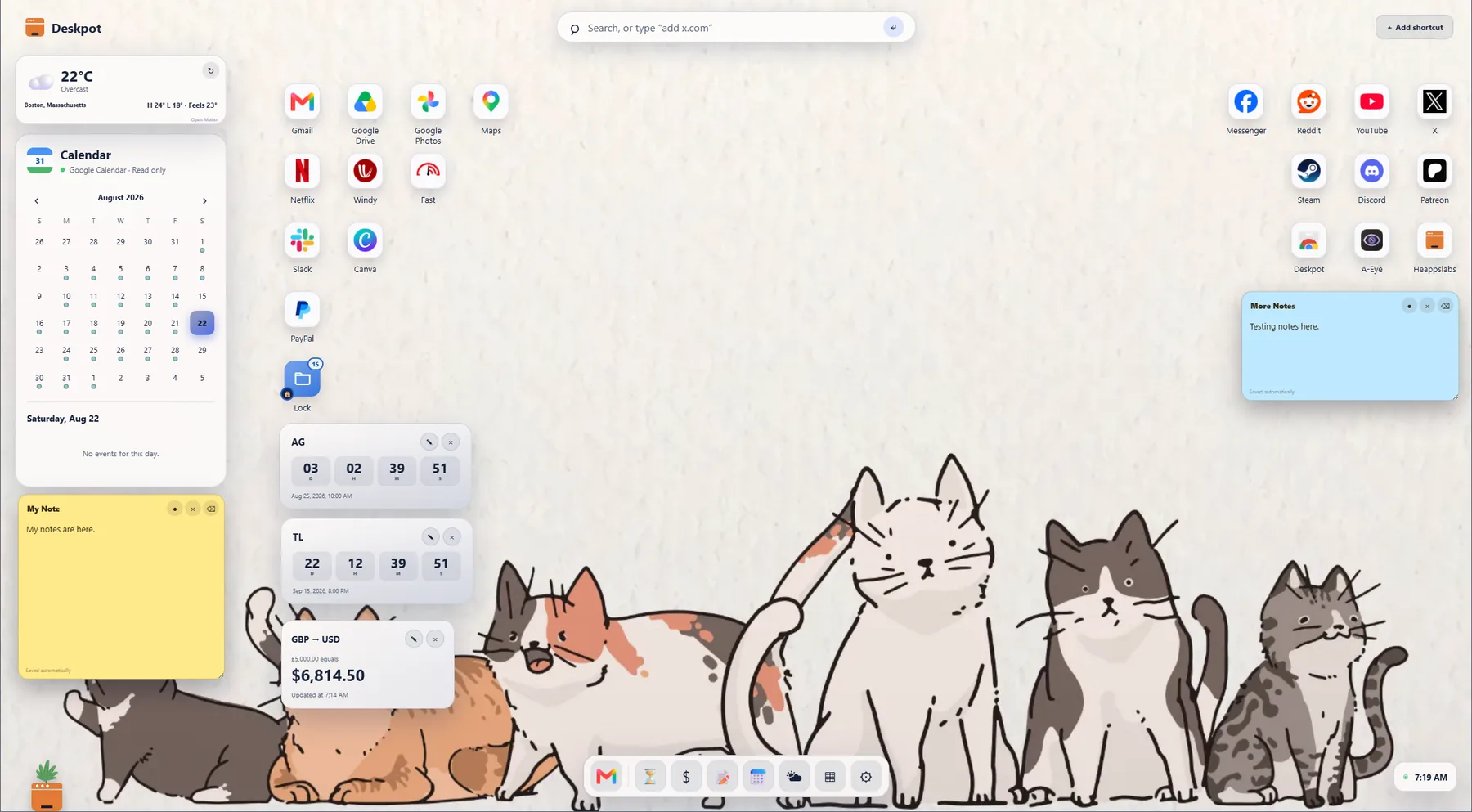
A real Deskpot Chrome new tab with a calendar, weather, countdown timer, currency converter, sticky note, shortcuts, and dock
A real Deskpot setup with daily tools arranged like a desktop.

CHROME COUNTDOWN TIMER

A new tab countdown timer for the moments that matter.

Keep a launch, trip, birthday, exam, deadline, or other important date visible each time you open a Chrome new tab.

  • See days, hours, minutes, and optional seconds in a live countdown.
  • Choose a compact number layout or a natural sentence-style countdown.
  • Move the timer anywhere and personalize its colors or background image.
  • Use one countdown free, or keep up to six countdowns with Deskpot Pro.
Your countdown names, dates, positions, and appearance are stored with your Deskpot setup.

CHROME CURRENCY CONVERTER

Convert currencies without leaving your new tab.

Deskpot includes a movable currency converter widget for quick everyday conversions while shopping, traveling, freelancing, or comparing prices.

  • Choose source and destination currencies, enter an amount, and swap the pair quickly.
  • See when the displayed exchange rate was last updated.
  • Keep the converter where it fits your desktop instead of opening another website.
  • The amount you type remains on your device; only the selected currency codes are sent for the rate request.
Deskpot requests current reference rates from Frankfurter and caches them locally for up to 15 minutes.

CHROME CALENDAR

A month calendar on every Chrome new tab.

Use the built-in month calendar by itself, or optionally connect Google Calendar to see upcoming events from your primary calendar.

  • Move through months without leaving your personal web desktop.
  • Show or hide the calendar whenever you want from Deskpot's quick access dock.
  • Connect Google Calendar only when you choose and disconnect it inside Deskpot at any time.
  • Deskpot uses read-only access and cannot create, edit, or delete your events.
Connected events are requested for the visible month and shown inside the Deskpot calendar widget.

CHROME WEATHER WIDGET

See local weather as soon as a new tab opens.

Choose a city and keep the current conditions close to your shortcuts, calendar, and other daily tools.

  • See the current temperature, weather condition, and daily high and low.
  • Choose Celsius or Fahrenheit and place the weather with the calendar on either side.
  • Deskpot uses the city you enter rather than requesting precise device location.
  • Weather stays useful between requests with a local 30-minute cache.
City lookup and weather information are provided through Open-Meteo.

CHROME STICKY NOTES

Sticky notes that stay on your Chrome new tab desktop.

Capture a reminder, small task, phone number, link, or passing thought without opening a separate notes app.

  • Write directly on a movable, resizable note and let Deskpot save it automatically.
  • Place notes beside the shortcuts or widgets they relate to.
  • Hide a note without deleting it, then restore it from quick access when needed.
  • Use one sticky note free, or unlock unlimited sticky notes with Deskpot Pro.
Sticky note content stays in Chrome's local extension storage unless you deliberately export or back up your Deskpot setup.

ONE EXTENSION, LESS CLUTTER

Why install five separate Chrome extensions?

A single-purpose countdown or sticky-note extension can solve one small problem. Deskpot keeps those tools together in the Chrome page you already open all day, while still leaving room for shortcuts, folders, a dock, wallpapers, and the plant that makes your desktop feel alive.

Looking mainly for faster website access? See why Deskpot is also a Chrome speed dial alternative.

Get Deskpot Free